
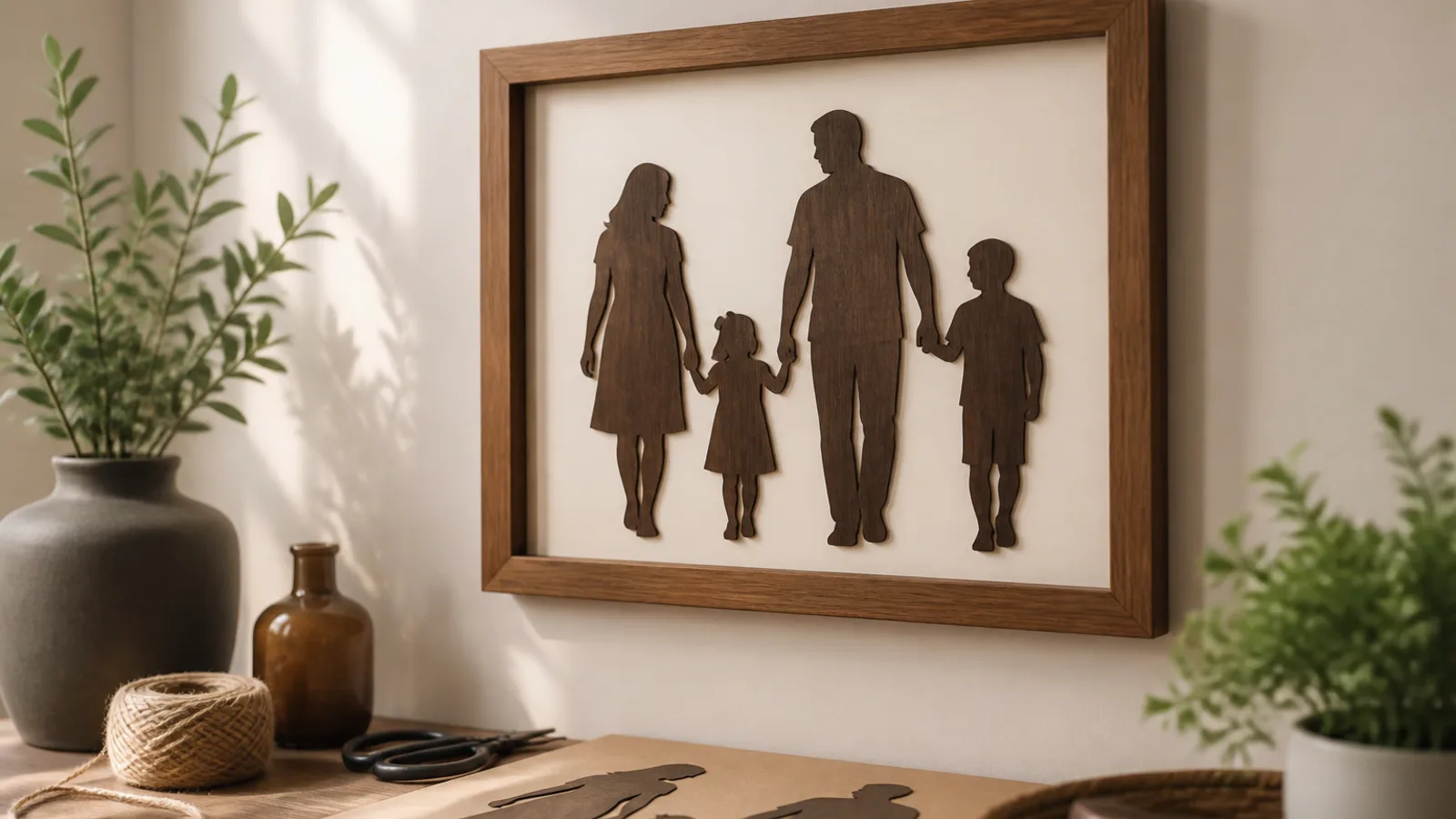
There’s something especially touching about turning a favourite family picture into something you can hang on the wall. Done well, it feels personal without looking rushed or overly crafty. If you want to turn a photo into cricut wall art, the good news is that you do not need a studio-perfect portrait. You need the right image, a simple plan, and a clean design that suits the material you choose.
The key is to think like a cutter, not just a photographer. A photo with strong contrast, a simple background, and clear outlines will usually give you a much better result than a busy snapshot with soft edges and tiny details. From there, you can make a stencil, a silhouette, or a layered portrait that feels polished enough for gifting.
What kind of family photo works best for Cricut wall art?
Not every photo is a good candidate, and that is where many people go wrong. A beautiful image on your phone can still be awkward once it is turned into cut lines. The best photos for wall art have shape, clarity, and enough separation between the subject and the background.
Look for these qualities:
- Strong contrast between the people and the background.
- Simple surroundings, such as a plain wall, sky, fence, or softly blurred background.
- Clear outlines around faces, shoulders, arms, and hair.
- Fewer subjects if you want a clean silhouette or stencil.
- Good lighting so the photo does not rely on tiny shadows for detail.
Photos that often work well include a couple standing close together, a parent and child portrait, or a family picture taken outdoors with enough light to separate everyone from the background. A photo taken on a beach, in a park, or against a simple wall can be easier to simplify than a crowded living room shot.
What tends to cause trouble?
- Busy backgrounds with furniture, decorations, or lots of people.
- Low-light selfies where faces are dark or grainy.
- Group shots where each person is tiny.
- Patterns, lace, curls, stripes, and other detail-heavy areas that can disappear or turn messy in a cut file.
If you are unsure, zoom in on the photo and ask one question: can I still clearly see the outline of the people if I ignore the background? If the answer is no, the image will probably need more simplification before it becomes wall art.
How to turn a photo into Cricut wall art
The easiest way to keep this project tidy is to move through it in stages. First choose the right photo. Then simplify it. Then turn it into a cut-ready design. Finally, test the size and cut the material that best suits the look you want.
1. Start by cropping and simplifying the photo
Before you do anything else, crop away anything that does not help the design. If the photo includes a lot of extra space, trim it so the family fills the frame better. This often makes a huge difference.
Next, decide how much detail you really want to keep. For a stencil or silhouette, less is usually better. You may only need the outline of the heads, shoulders, arms, and upper body. If you try to preserve every eyelash and fold in a shirt, the design can become fragile and difficult to weed.
If your editing app allows it, increase contrast slightly so the subject separates more clearly from the background. A quick check in black and white can help you see whether the edges still read cleanly. If the photo is too soft, grainy, or shadowy, though, adding more contrast will not always save it. Sometimes the cleanest solution is choosing a different photo altogether.
2. Choose the style that suits the photo
There are three main directions you can take.
Stencil: A stencil-style design is ideal if you want a bold, graphic look. This works well on vinyl, wood, or cardstock, especially when the background is simple and the subject shape is easy to read. It is also one of the easiest ways to make a photo-based wall piece feel modern.
Silhouette: A silhouette strips the photo down even further. This is a good choice for side profiles, simple poses, or images where the body shape is more important than facial detail. It can look elegant in black vinyl on a light background, especially in a frame or on a painted sign.
Layered portrait: If you want something richer and more artistic, a layered portrait may be the better option. This style separates the artwork into multiple colour layers, which can make it feel more like a custom illustration than a flat cutout. It works especially well when the photo has distinct clothing colours or clear sections that can be simplified.
One option is StudioSVG Create’s photo to SVG tool, which can turn a person or pet photo into a stencil or colour portrait alongside other Cricut-friendly tools.
3. Watch out for the common speckled-trace mistake
This is the problem that catches many beginners. The converted file looks like it has been sprinkled with tiny dots, little islands, and stray specks that do not belong. The result can be messy, especially once you start cutting and weeding.
Why does this happen? Usually because the original photo has too much texture, too little contrast, or too many tiny details. Hair strands, patterned clothes, shadows, grass, and background clutter can all create noise in the final design.
To avoid it:
- Use a photo with a cleaner background.
- Remove or blur background detail before converting.
- Keep the design fairly bold and simple.
- Delete tiny stray shapes before cutting.
- Zoom in and inspect the file at the size you plan to cut.
A good rule: if the design looks fuzzy or busy on screen, it will usually look worse in vinyl or cardstock. Clean it up first.
4. Resize the design before you cut anything
Size matters more than many people expect. A design that looks fine at phone-screen size can become awkward when it is enlarged, especially if it contains thin details. Before cutting, decide where the finished piece will live.
Ask yourself:
- Is this going in a small frame on a shelf?
- Will it hang on a hallway wall?
- Is it meant to be a larger feature piece above a console or mantel?
For a first project, it often helps to print the design on paper and hold it up in the intended space. That gives you a better sense of proportion than guessing on screen. If the piece is for gifting, this step can also help you avoid making it too small to feel special.
5. Cut, weed, and test before committing to the final material
Once the file looks clean and the size feels right, do a test cut if you can. Even a small sample can reveal whether tiny details are too delicate or whether parts of the design will peel away during weeding.
When weeding, take your time around faces, hairlines, and narrow connecting pieces. If a section keeps tearing, it may be too detailed for the material you chose. That is not a failure; it is a sign to simplify the design and try again.
If you are using vinyl on canvas, press firmly so the texture does not lift the edges of fine lines. Canvas can look beautiful, but it is less forgiving than a smooth surface when the artwork includes small details.
Best materials for photo-based wall art
The material you choose changes the whole mood of the project. Some finishes feel crisp and modern. Others feel warm and handmade. There is no single right answer, but there is a best choice depending on the style of artwork you want.
Vinyl on canvas
This is a strong option if you want something clean and easy to hang. Vinyl works well for silhouettes and bold stencil-style pieces because it gives you a sharp edge and a smooth finish. Canvas adds a soft, decorative feel without needing a frame.
Why people like it:
- It looks polished without much hardware.
- It is lightweight.
- It suits modern, minimalist interiors.
It is especially good for a gift that needs to feel finished but not overly formal.
Wood sign
Wood gives the design more warmth and texture. It is a lovely choice for family names, dates, and stencil-style portraits, especially if you want a rustic or farmhouse look. A painted or stained wood background can make a simple silhouette feel very special.
Wood is less forgiving than canvas when it comes to very small details, so it works best with simplified designs. If your photo still contains lots of fine lines, consider trimming it down even more before cutting.
Framed cardstock
If you want something budget-friendly and easy to present as a gift, framed cardstock can be a lovely choice. Cardstock is useful for layered portraits, shadow-box styles, or bold cut shapes that sit neatly inside a frame.
This option is especially practical if you want to mail the gift or make several versions for different relatives. It can look surprisingly elegant when the colours are coordinated well and the mat is kept simple.
Think of it this way: vinyl is great for clean lines, wood is great for texture, and cardstock is great for flexibility.
How to make the design feel personal, not generic
The best wall art does not just resemble the photo. It also feels like it belongs to the person receiving it. That comes down to the small decisions around styling and presentation.
Try these finishing touches:
- Match the frame or backing colour to the room.
- Keep the composition centred and balanced.
- Use a matte finish if glare might be an issue.
- Add a date, surname, or short phrase if it suits the occasion.
- Choose colours that reflect the recipient’s home rather than just your own taste.
A black silhouette in a natural wood frame feels different from a soft cream portrait in a white frame, even if the photo is the same. Small choices like that help the piece feel intentional.
If you are making the artwork as a holiday or anniversary gift, think about the story you want it to tell. A new family portrait can celebrate a milestone year. A simple silhouette can honour a wedding anniversary. A pet-and-owner image can feel thoughtful without being overly formal.
When a photo is simplified well, the design should still feel like the people in it. The goal is not to keep every detail. The goal is to keep the feeling.
Practical examples to try
Here are a few situations where this project works especially well:
- Holiday gift for grandparents: Use a recent family photo with a plain background, cut it as a silhouette, and frame it with the family name and year.
- Anniversary present: Turn a couple portrait into a layered design with soft colours that suit the home, such as cream, warm grey, or muted gold.
- Housewarming gift: Make a wood sign with a clean stencil-style family image and a short phrase underneath.
- Nursery or playroom decor: Use a simple parent-and-child portrait on canvas in gentle tones.
One of the easiest ways to keep the project manageable is to reduce the number of subjects. A couple or a parent and child almost always cut more cleanly than a large group photo. If you want to include everyone, choose a pose where the bodies overlap in a readable way and the background is not crowded.
What to do if the first version does not look right
Many people need more than one attempt. That is normal. If your first cut looks too busy, do not force it to work.
Instead, simplify one thing at a time:
- Use a clearer photo.
- Remove more background detail.
- Make the design larger.
- Drop tiny internal cutouts.
- Switch from a layered portrait to a silhouette.
If the face is getting lost, try focusing on the profile or upper body shape instead of the full photo likeness. If the cut pieces keep tearing, widen the lines or choose a sturdier material. If the design feels flat, add a second colour layer or pair it with a contrasting background.
Good DIY wall art is often a process of simplifying until the design finally feels calm and readable.
FAQ
What kind of photo turns into the cleanest Cricut wall art?
The cleanest results usually come from photos with strong contrast, simple backgrounds, and clear outlines around the subject. Outdoor portraits, posed family photos, and images with good light often work better than dark snapshots or busy group pictures.
Should I use a stencil, silhouette, or layered portrait?
If you want the easiest and boldest option, start with a stencil or silhouette. If you want more depth and a more illustrated look, go with a layered portrait. The best choice depends on how much detail your photo has and how polished you want the final piece to look.
What is the easiest material for a beginner?
Vinyl on canvas is often the simplest starting point because it is lightweight, forgiving, and easy to frame or hang. Framed cardstock is also beginner-friendly if you want a paper-based project with a neat, finished look.
How do I stop the design from turning into a speckled, messy trace?
Use a simpler photo, reduce background clutter, and inspect the file closely before cutting. If you see lots of tiny dots or thin fragments, remove them manually or simplify the image further. The more the design depends on tiny details, the more likely it is to look messy once cut.
Can I use a phone photo, or do I need a professional picture?
A phone photo can work perfectly well if it is clear, well lit, and not too busy. You do not need a professional portrait. What matters most is contrast and simplicity, not camera quality alone.
How big should the finished wall art be?
That depends on the space. Small frames work well for shelves and bedside tables, while larger wall spaces usually need a bigger design to feel balanced. A quick paper mock-up can help you judge the size before you cut the final material.
Conclusion
To turn a photo into cricut wall art that feels thoughtful rather than rushed, start with the right image, simplify it with purpose, and choose a material that suits the style you want. The strongest projects are usually the ones that keep the outline, the mood, and the sentiment while letting go of distracting detail. That balance is what makes the finished piece feel personal, giftable, and genuinely worth displaying.
Disclosure: StudioSVG Create is a sister brand of Maallure.

Join the conversation
Sign in — Sign in to join the conversation.